


CCNA INTERVIEW QUESTIONS & ANSWERS
Sunday, July 2, 2023
Looking for the CCNA interview Questions to prepare for the CCNA interview? Well, you have landed in the very right place. Cisco Certified Network Associate, popularly known as CCNA, is a certification exam that qualifies IT professionals to perform various entry-level tasks within the IT industry. The CCNA certification deals with validating the skill, ability and expertise of an individual to fix, configure and troubleshoot networks.
In this blog, we have listed the most frequently asked CCNA interview questions and answers to ace your interview with confidence.
CCNA Interview Questions - for Beginners
1. What is routing?
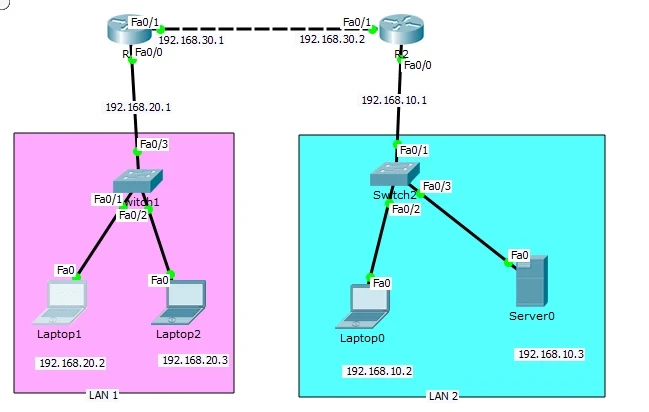
Routing is the process of finding the right path for transferring data from the original source to the destination. Routing is carried out using a device known as a router, which is a network layer device.
2. How many layers are there in an OSI reference model? Name them.
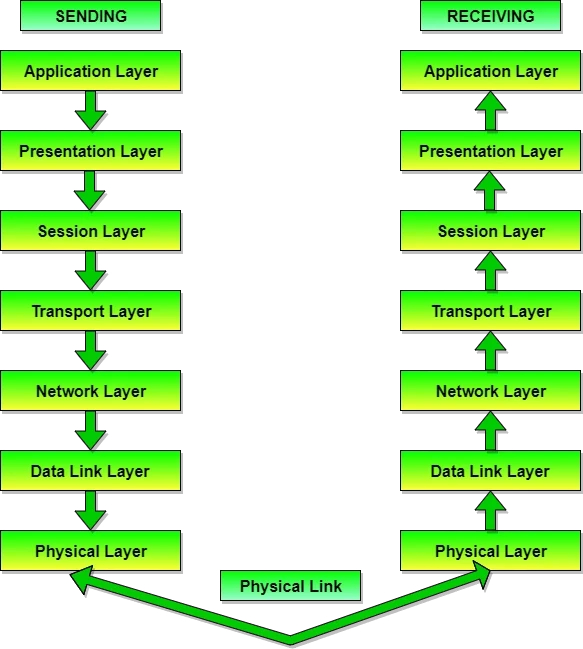
There are 7 layers in an OSI (Open Systems Interconnection) reference model. They are:
Physical layer
Data link layer
Network layer
Transport layer
Session layer
Presentation layer
Application layer
3. Explain HDLC.
HDLC (High-Level Data Link Control) is a group of communication protocols that usually provides reliable delivery of data frames over a communication or network link. It is a proprietary protocol for CISCO and is the default encapsulation used within CISCO routers. It also ensures the error-free transmission of data and can provide both connection-oriented and connectionless services.
4. What is CDP?
CDP, short for “Cisco Discovery Protocol,” is a layer 2 protocol that works on a Media Access Control (MAC) address. CDP may be used to identify port numbers, iOS details, router models, device IDs, and switch models.
5. What is BootP?
BootP, short for “Boot Program,” is a protocol that is mostly used to boot diskless workstations that are connected to one network. A diskless workstation may also use BootP to determine its IP address and the IP address of the server PC.
6. What is the purpose of the Data Link layer?
The data link layer of the OSI model (Layer 2) prepares network data for the physical network. The data link layer is responsible for the network interface card (NIC) to network interface card communications. Along with this, the data link layer serves the following purposes:
Enables upper layers to access the media.
Accepts data, usually Layer 3 packets (i.e., IPv4 or IPv6), and encapsulates them into Layer 2 frames.
Controls how data is placed and received in the media.
Exchanges frames between endpoints over the network media.
Performs error detection and rejects any corrupt frames.
7. What does the LLC sublayer do?
Logical Link Control (LLC) is a sublayer that usually provides the logic for the data link as it controls the synchronisation, multiplexing, flow control, and even error-checking functions of DLL (Data Link Layer). DLL is divided into two sublayers, i.e. LLC sublayer and MAC (Medium Access Control) sublayer.
8. What is MTU?
A maximum transmission unit, also called MTU, defines the largest size of the packet that can be transmitted as a single entity in a network connection. The size of the MTU defines the amount of data that can be transmitted in bytes over a network.
9. What is the role of the LLC sublayer?
The LLC sublayer stands for Logical Link Control. It can provide optional services to an application developer. One option is to provide flow control to the Network layer by using stop/start codes. The LLC can also provide error correction.
10. What is OSPF? Describe it.
OSPF stands for Open Shortest Path First. It uses the Dijkstra algorithm and is a link-state routing protocol that is used to connect to a large number of networks without any limitation on the number of hops.
11. What is subnetting?
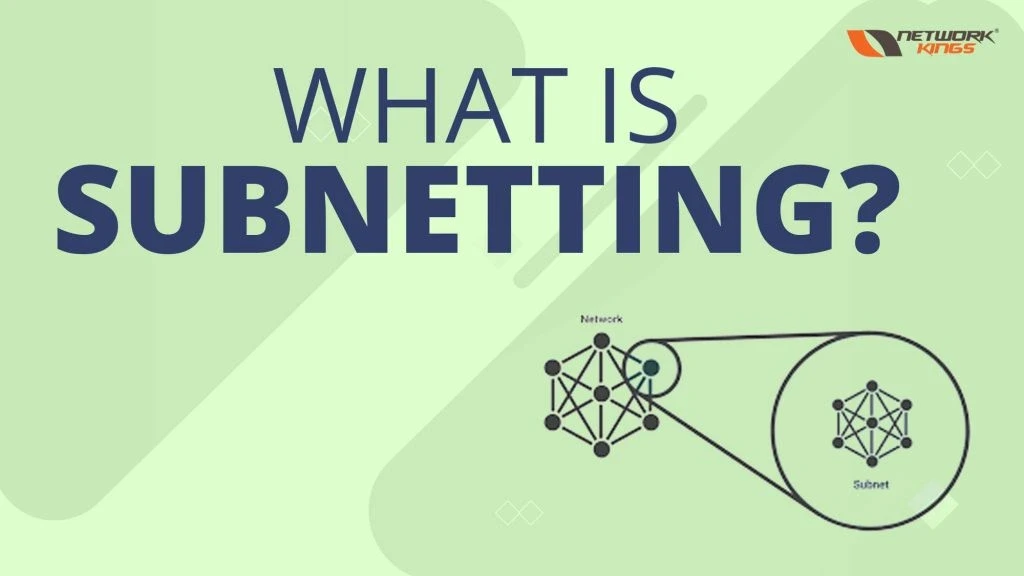
Subnetting is when smaller networks are created from a larger parent network. Each subnet is given an identifier or certain parameters within the network to indicate its subnet number.
12. Give some benefits of LAN switching.
– allows full-duplex data transmission and reception
– media rate adaptation
– easy and efficient migration
13. Define ARP.
The Address Resolution Protocol is a communication protocol used for discovering the link layer address, such as a MAC address, associated with a given internet layer address, typically an IPv4 address. This mapping is a critical function in the Internet protocol suite.
14. What is Spanning Tree Protocol?
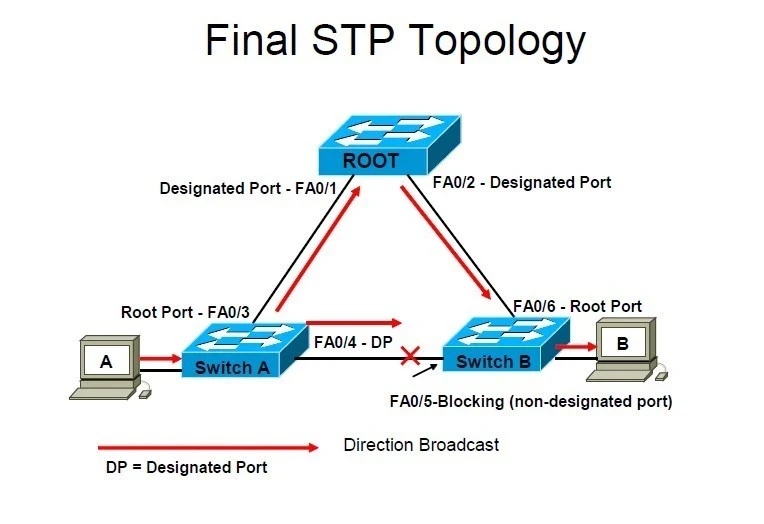
Spanning Tree Protocol (STP) is a protocol that prevents layer 2 loops. STP enables switches to become more aware of each other so that they can negotiate a Loop-free path through the network. It chooses a reference point (Route Bridge) in the network and calculates all the paths that are no longer useful (known as redundant links) to that reference point. Then it selects one path to forward frames and blocks other redundant paths. When blocking happens, loops are prevented.
15. Define Network Congestion.
Network congestion refers to a reduction in quality of service (QOS) that causes packet loss, queueing delay, or the blocking of new connections. It occurs when the traffic flowing through a network exceeds its maximum capacity, meaning when a link or network node is handling data in excess of its capacity.
Effects of network congestion :
Queueing delay
Packet Loss
Slow Network
Blocking of new connections
Low throughput
Ways to fix network congestion :
Divide your network into subnets that can be resized to meet traffic.
TCP/IP settings should be adjusted to balance packet send/request speeds.
Upgrade your Internet plan to allow for more devices and increased bandwidth.
16. What is the difference between User Mode and Privileged Mode?
User Mode is commonly utilised for performing regular tasks on a CISCO router. For example, User Mode may be used to connect to remote devices or check the status of a router. Privileged Mode is used to perform higher-level tasks on the router, such as debugging and making configurations. Privileged Mode also includes all of the options that are available for use in User Mode.
17. What is a MAC address?
A MAC address is the abbreviation for a Media Access Control address. This address is the identification used to depict a media access control layer in a network’s architecture. It’s most commonly stored in the ROM and is different for each device.
18. What is EIGRP?
EIGRP stands for Enhanced Interior Gateway Routing Protocol; it is a routing protocol designed by Cisco Systems. It is available on a router to share routes with other routers within the same autonomous system. Unlike other routers, like RIP, EIGRP only sends incremental updates, decreasing the workload on the router and the amount of data that needs to be transferred.
EIGRP protocol consists of :
Bandwidth
Load
Delay
Reliability
MTU
Maximum Transmission Unit
19. What are the different memories used in a CISCO router?
Different memories used in a CISCO router are:–
NVRAM stores the startup configuration file.
– DRAM stores the configuration file that is being executed.
– Flash Memory – stores the Cisco IOS.
20. What is the function of the Application Layer in networking?
The Application Layer supports the communication components of an application and provides network services to application processes that span beyond the OSI reference model specifications. It also synchronises applications on the server and client.
Check Live Free Webinar
CCNA Interview Questions - for Experts
Qus1:-What does cat stand for in networking?
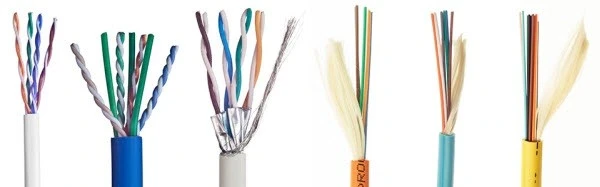
Ans:- Cat stands for “CATEGORY“. Which started from Cat1 (Category 1) and now extends up to Cat7 (Category 7). An improved version/category of cable improves the quality of data transmission and makes an enhancement in bandwidth, providing more stability.
Cat 1 ? used for voice only
Cat 2 ? used for voice telephone & data communication, maximum? bandwidth? Is 4?Mbit/s.?Cat 2 cable contains 4 pairs of wires, or 8 wires total.
Cat 3 – used for voice & data communication. Category? 3 cable, commonly known as? Cat 3?or?station wire, Carry data up to 10?Mbit/s.
Cat 4 – It is used in telephone networks that can transmit voice and data up to 16 Mbps.Mbit/s
Cat 5 – The cable provides performance of up to 100?MHz and Cat? 5 is also used to carry other signals, such as? telephony and video.Cat5 does not support an exact 100 MHz. But Cat5e provide an exact 100 MHz bandwidth.
Cat 6? It increases the performance by up to 250.MHz compared to 100?MHz for Cat? 5 and Cat?5e.
Cat7– ?Ethernet cable is the newest cable category, operating at speeds of 10 Gb/s at 100 meters of cable and transmitting frequencies up to 600 MHz.
Qus2:- What is APIPA
Ans:- Automatic Private IP addressing with this, A DHCP client can automatically configure an IP address & subnet mask when no DHCP server is available.
It was a random address range of Class B from 169.254.0.1 to 169.254.255.254. default subnet mask of 255.255.0.0
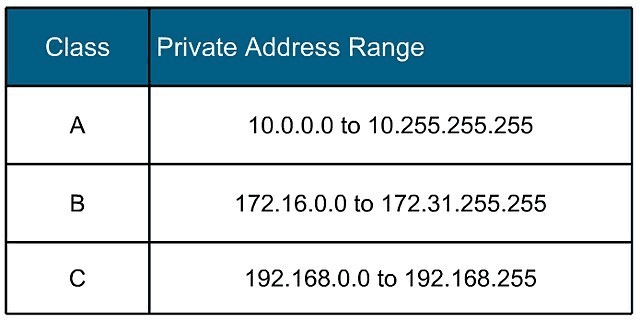
Qus3:- Private IP Address Range of IPV4
Ans:- 3 groups of Private IP addresses-
Class A ? 10.0.0.0 to 10.255.255.255.254
Class B ? 172.16.0.0 to 172.31.255.254
Class C ? 192.168.0.0 to 192.168.255.254
Qus4:- Broadcast Domain and Collision Domain
Ans:-
HUB? Single Broadcast Domain and Single Collision Domain
SWITCH? Single Broadcast Domain and Multiple Collision Domains. But it can also separate the Broadcast Domain by using VLANs
ROUTER? Multiple Broadcast and Multiple Collision Domains
Qus5: What does cat stand for in networking?
Ans:-?A? collision domain? is a network segment with two or more devices sharing the same bandwidth (where there is a chance of collision)
A broadcast domain is a logical division of a computer network, in which all nodes can reach each other by broadcast at the data link layer.
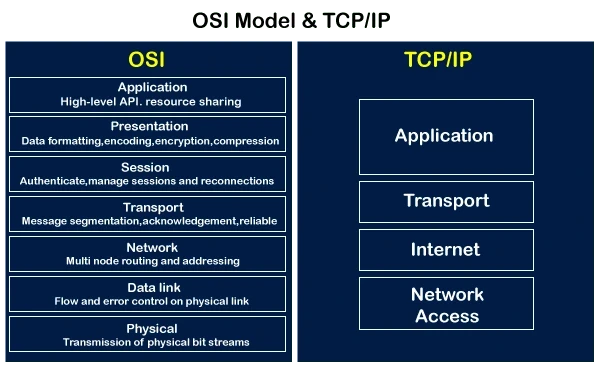
Qus6:- OSI and TCP/IP Model
Ans:- OSI stands for Open System Interconnection, developed by the International Standard Organisation ISO. It is just a reference model.
Consists of 7 layers, which has to top?
Application Layer
Presentation Layer
Session Layer
Transport Layer
Network Layer
Data Link Layer
Physical Layer
TCP/IP came 10 years before the OSI Model, and it actually works in real scenarios.
Consists of 4 layers —
Application Layer
Transport Layer
Internet layer
Network Interface layer/Link Layer /Network Link Layer
Qus7:- Port numbers of TCP and UDP Protocols
Ans:- Server provide their services based on port numbers. We have two types of connections?
Transmission control protocol (TCP) & User datagram Protocol (UDP)
TCP? Connection Oriented
File Transfer Protocol (FTP) ? 21
Hypertext Transfer Protocol (HTTP) — 80
Hypertext Transfer Protocol Secure (HTTPS)– 443
Secure Shell -22
Telnet ? 23
Simple Network Management Protocol (SNMP? 161/162
SMTP – 25
DNS-53
Internet Message Access Protocol (IMAP)? 143
Border Gateway Protocol (BGP) — 179
UDP? Connection Less
Domain Name System (DNS)? 53
Dynamic Host Configuration Protocol (DHCP)? 67/68
Trivial File Transfer Protocol (TFTP)? 69
Network Time Protocol (NTP)? 123
Simple Network Management Protocol (SNMP)? 161/162
Qus8:- What is a Firewall?
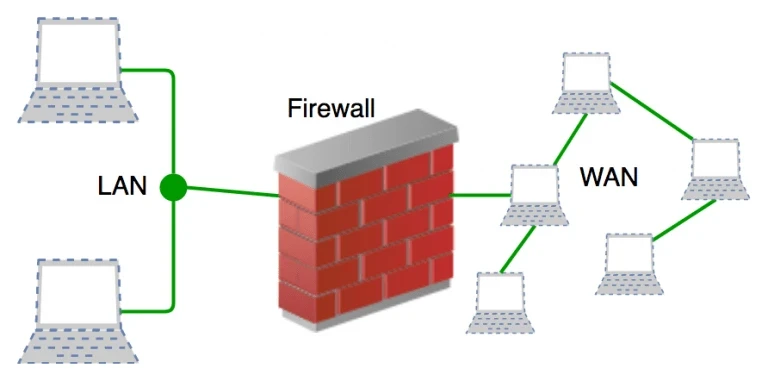
Ans: – A Firewall is a network security device or network security system that helps to provide security to an intranet (private Network). So that any unauthorised user can enter their area. We can also apply security on routers (networking devices) as well, but only to some extent. Routers provide very little security (Layer 3 device, work on the Internet Layer).
A firewall separates the internal (private) & external (public) network. It establishes a barrier between a trusted internal network and an untrusted external network.
Firewalls can be either hardware or software, or a combination of both.
Types of firewall —
network firewalls? or? Firewalls
list of some companies that provide? Network Security Services&?Appliances
Qus9:- What is a Router?
Ans:- Router is an L3 -Network Layer device. It is basically used for routing purposes. Every router has its own brain. They choose the best path from source to destination by checking the information/the best suitable path in their routing information table(RIB).
Types of Routing?
Static Routing
Default Routing
Dynamic routing
Interior gateway routing protocol
Distance vector routing
RIP, RIPV2
Link state routing
OSPF, IS-IS
Advanced Distance Vector Routing
EIGRP (extended version of IGRP)
Exterior gateway routing protocol
BGP
Qus10:- Difference between OSPF multicast address 224.0.0.5 and 224.0.0.6?
Ans:- 224.0.0.5 – AllSPFRouters: Used to send OSPF messages to all OSPF routers on the same network. The AllSPFRouters address is used for Hello packets. The DR and BDR use this address to send Link State Update and Link State Acknowledgment packets.
224.0.0.6 – AllDRouters: Used to send OSPF messages to all OSPF DRs (the DR and the BDR) on the same network. All OSPF routers except the DR use this address when sending Link State Update and Link State Acknowledgment packets to the DR.
Qus11: - AD value of Dynamic Routing Protocols -- RIP, EIGRP &OSPF.
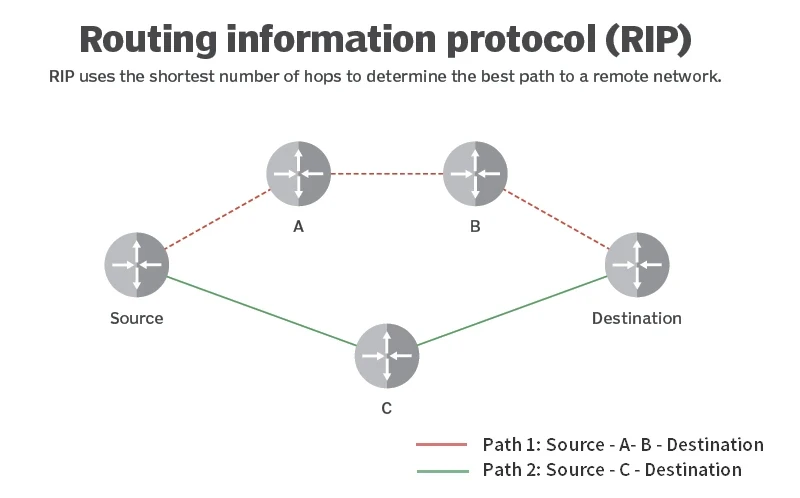
Ans:-Admistrative Distance (AD) Value of RIP is 120 with a maximum of 15 hop count as linear. Broadcast address of RIPV1 is 255.255.255.255, and it doesn’t carry the subnet mask value. The multicast address of RIPV2 is 224.0.0.9, and it does support subnetting.RIP Timers are? Update timer? 30 sec, invalid timer/hold down timer? 180 seconds, and the last one flush timer is 240 seconds.
AD value of EIGRP is 90, and the multicast address is 224.0.0.10. Does it maintain the 3 tables? Neighbour table, topology table and Routing table.
Are packet types?
Hello pkt ? 5 sec
Update pkt ? 1 5 sec
Query
Reply
Acknowledgment
It uses the Reliable Transport Protocol with the 88 protocol number
AD value of OSPF is 110, and multicast addresses are 224.0.0.5 &224.0.0.6. Does it maintain the 3 tables? Neighbour table, Database table and Routing table.
Are packet types?
Hello pkt
DBD (Database Description)
LSR (Link State Request)
LSU (Link State Update)
LSA (Link State Acknowledgment)
Less AD value is always reliable/preferable.
Qus12:- How many States are there in OSPF?
Ans:-OSPF has to go through 7 states to become neighbours. There are 8 states in OSPF.
DOWN
INIT
2-WAY
ExSTART
EXCHANGE
LOADING
FULL
Qus13:- Maximum HOP Count in RIP, EIGRP and OSPF
Ans:-RIP, EIGRP and OSPF are Dynamic Routing Protocols.
RIP Maximum hop count value is 15 as linear
EIGRP Maximum hop count value is 255
OSPF can use an unlimited number of hop counts, but it is recommended to use
Maximum up to 100 hop count.
Qus14:- Which protocol supports equal and unequal load balancing?
Ans: – EIGRP support Equal and Unequal load balancing, RIP and OSPF only support Equal load balancing.
Qus15:- Router-ID selection in OSPF
Ans:- the highest IP address of the active physical interface of the router is the Router-ID.
If logical interface loopback is configured, the highest IP address of the logical interface is the Router-ID.
Physical interface can go down any time, but the logical interface not.
If we add one more loopback 20.1.1.1, higher than 1.1.1.1, here 20.1.1.1 will become your Router-ID
Qus16:- EIGRP work on which algorithm and its metric calculation
Ans:- EIGRP work on Defusing Update Algorithm (DUAL)
Metric Calculation formula —
10^7/(Min Bandwidth)
Sum of delays/10
Metric =( Bandwidth + Delay)*256
Qus17:- Working of Switch
A switch is an interconnecting device with 16 or 24 ports in common. All other devices are connected to these ports. Whenever any machine sends a packet to any other machine, the source machine sends the packet to the switch, then forwards it to the destination machine. Each packet that comes to the switch contains the source and destination physical address, based on which the switch forwards the packet to another machine. The switch always sent a packet based on the destination MAC address. Its process is as follows:
(process also known as Switching)
1. When the switch receives a packet from any device, it checks for its destination MAC address.
2. Then switch compares the destination MAC address with its MAC Address Table for the corresponding MAC address.
a. If the MAC Address is found, the packet is sent out to the port against which the MAC Address was matched.
b. If entry is not found, Unknown unicasts (when the switch doesn’t have a port mapping for a destination MAC address in the frame) are treated like broadcasts by Layer Two devices, and are flooded out of all ports except the port on which the frame originated.
Now the question comes, how does the switch know on which port the destination machine is connected? — This switch uses one table in its cache memory called the MAC Address table or Forwarding Table, in which the switch stores that at which port which machine is connected to, storing its physical address (MAC Address). So the table contains two columns (Physical Address and Port Number) and rows equal to the number of ports in the switch.
When the switch is turned ON, by default, there is no entry in the MAC address table. As communication starts, based on the devices involved, entries are created in a table.
Qus18:- Working of Address Resolution Protocol (ARP)
ARP is a layer 2 protocol used for obtaining the MAC address of any device within a network. Host machines use the ARP protocol to obtain the MAC Address. ARP protocol in conjunction with Layer 3 IP Protocol addressing (IP Address).
The host machine uses ARP because when a machine needs to send a packet to another device, the destination MAC address needs to be written in the packet sent, so the host machine should know the MAC Address of the destination machine. Operating Systems also maintain the ARP Table (MAC Address Table).
To obtain the MAC address, ARP performs the following process: (ARP request by the host machine)
1. The source machine generates an ARP REQUEST packet with source MAC address (of this machine), source IP address (of this machine) and destination IP address and forwards this packet to the switch.
2. Switch receives the incoming packet and reads the source MAC address, and checks its MAC address table. If an entry for the packet at the incoming port is found, then it checks its MAC address with the source MAC address and updates it; if an entry is not found, then the switch adds an entry for the incoming port with the MAC address.
3. All ARP REQUEST packets are broadcast in the network, so the switch broadcasts the ARP REQUEST packet in the network, because the destination for the ARP packet will be 255.255.255.255. (Broadcast are those packets which are sent to everyone in network except the sender, only in network to which it belongs, it cannot span multiple networks)
4. All devices in the network receive an ARP packet and compare their own IP address with the destination IP address in that packet.
5. Only the machine that matches both will reply with an ARP reply packet. This packet will have the source IP of this machine (which was the destination machine in the previous packet, as now it's replying, this machine will be the source machine), source MAC address, destination MAC address (same as source MAC address in REQUEST packet) and destination IP address (same as source IP address in REQUEST packet).
6. Then switch reads the ARP reply message and adds an entry in its MAC Address Table for the port number on which it has received a packet by reading its source MAC address field and forwards that packet to the destination machine (source machine in REQUEST packet) as its MAC is the destination MAC address.
7. The further host machine adds the destination machine entry into its ARP table. This utilises an ARP resolution switch and other network devices to obtain the MAC address of any other device on the network. Remember ARP works on broadcast, so it works only in a single network.
Qus19:- Difference between access link and trunk link?
Ans:-Access link ? Access link carries only one VLAN information. It does not tag the frame. Mainly, this link is established between the computer/PC/Node and the Switch.
Trunk Link? The runk link carries information about multiple VLANs. It tags the frame. So, the receiving switch would know which VLAN’s information it has carried and transfer/pass that information accordingly. Mainly, this link is established between the Switches.
Qus20 :- Native VLAN
Ans:- Native VLAN is the only VLAN that is not tagged in the trunk. Native VLAN frames are transmitted unchanged. By default, VLAN 1 is the NATIVE VLAN. If your switch receives a frame with no VLAN information, it assumes this frame belongs to the NATIVE VLAN.
Types of VLANs?
Default VLAN
Native VLAN
DATA VLAN
VOICE VLAN
PRIVATE VLAN
MANAGEMENT VLAN
Qus 21: – If on 2 switches, different VLANs are configured and have an access link between the switches. Can the PC’s ping each other?
Ans:- They both can ping each other. The issue is that the switch interlink is on both access ports. An access port will not send or accept tagged traffic. Hence, when SW1 sends PC1’s traffic over the link, the tag is removed. When that packet comes into SW2’s fa0/8 interface, that interface is part of VLAN 20. SW2 will allow that frame to flow to PC2. The same happens vice versa.
Qus22: - Trunking protocols
Ans: – There are two trunking protocols?
ISL and IEEE DOT1Q/802.1Q
ISL? Inter Switch Link is Cisco's proprietary protocol. That is 30 bytes in length. It adds 30 bytes of info in its frame, which obviously increases the size of the frame. Cisco also recommend using IEEE 802.IQ for encapsulation.
IEEE DOT1Q/802.1Q ? It is an open standard defined by IEEE. All vendors support this. It adds a 4-byte tag to the original frame. It doesn’t tag frames that belong to the native VLAN.
Qus23:- Why is VTP needed? Their modes, and which mode uses an extended VLAN?
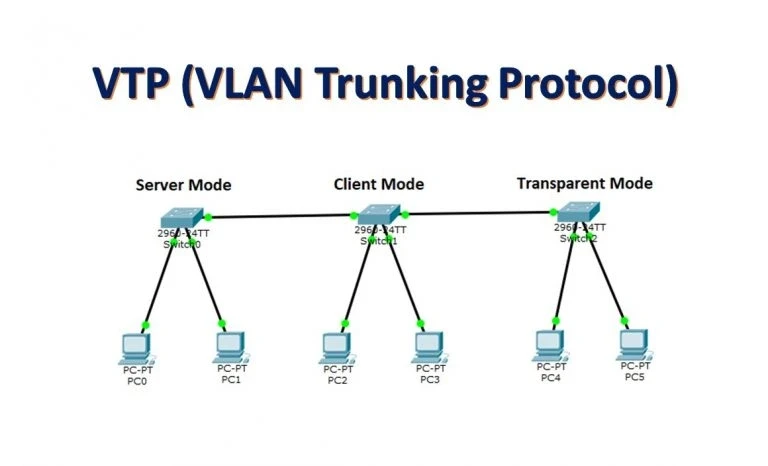
Ans:- Virtual Trunking Protocol used to propagate the VLAN Database. The database is created in the Vlan.dat file and stored in flash memory. VTP Modes?
Client Mode?
Cannot use extended VLAN.Server Mode?
Cannot use extended VLAN, by default, VTP is in server mode, Transparent Mode?
Can use extended VLAN ranges from <1006-4096>Off Mode?
VTP Off
Qus24 :- DHCP
Ans:- DHCP stands for Dynamic Host Configuration Protocol. It assigns IP addresses to the node/computer/PC automatically. It work on the Discover offer request acknowledgment DORA process. It is a UDP connectionless and supports port numbers 67/68.
Qus25:- PC/Computer/Node doesn't have an IP address, how will it contact the DHCP server?
Ans:- PC/Computer/node will send a request to all the connected devices via broadcast, but only the DHCP server will accept this request and assign an IP address from the pool to the system. It works on the “DISCOVER OFFER REQUEST ACKNOWLEDGMENT (DORA) “Process.
Qus26:- What is NAT?
Ans:- “ Network Address Translation“ It is a process where a network device, usually a firewall, assigns a public address to a computer (or group of computers )inside a public network (intranet).
The main use of NAT is to limit the no. of public addresses an organisation or company must use for both economy and security purposes.
It allows multiple private IP addresses to be represented by a smaller number of public IP addresses.
Types of NAT
Static NAT
Dynamic NAT
Port Address Translation PAT
Qus27:- In Ether Channel /Port Channel /Link Aggregation, two switches are connected. On one switch, lacP is running, and on another switch, pagP is running. Will they be able to establish communication?
Ans:-
“NO” all ports in an Ether Channel must use the same protocol; you can not use two protocols on two ends. In other words, pagP and lacP are not compatible, so both ends of a channel must use the same protocol.
Qus28:- Main difference between Standard and Extended Access- list? How is packet filtering done?
Ans:- Access-lists provide L3 security. There are 2 types of ACLs
Numbered
Named
The numbered Standard Access list range is from 1-99
It blocks a network, host and subnet.
All services are blocked
Implement closest to the destination
Packet filtering is based on only the source IP address.
Numbered Extended Access list range is from 100-99.
Can block a network, host, subnet and services.
Can block any specific service as per the requirement
Implement closest to the source
Packet filtering is based on source, destination address and protocol and port number.
“Named Access-List is mainly preferable because it has an editing feature”
Qus29:- IPV4 and IPV6 address types
Ans : – IPV4 —
Broadcast
Multicast
Unicast
PV6 ?
Multicast
Unicast
Anycast? Good feature in IPV6
“IPV6 is 128-bit long, having 8 octets/blocks. Each block contains 16 bits. It was implemented to reduce the address shortage in IPV4. An IP address is given to every device in the network, and it is used to identify the device within the network.
Qus30:- STP States and how Root Bridge, Root port and Designated Port got selected?
Ans: – Spanning Tree Protocol is a loop prevention technique defined by IEEE 82.1d.Switches run STP by default. Switches use the spanning tree algorithm STA to decide which port should be shut down.
STP States?
Disable
Blocking
Listening
Learning
Forwarding
The selection of Root Bridge is based on Bridge_ID, which consists of bridge priority and MAC address. By default, priority is 32768. If all switches have the same priority, then root bridge selection will be based on MAC address. Bridge_ID go in the BPDU packet. Every switch shares Bridge Protocol Data Unit (BPDU) after 2 seconds.
All ports of the Root Bridge are designated ports
The ports that are connected directly to the Root Bridge become the root port.
The convergence time of STP is 32 seconds

The founder of Network Kings, is a renowned Network Engineer with over 12 years of experience at top IT companies like TCS, Aricent, Apple, and Juniper Networks. Starting his journey through a YouTube channel in 2013, he has inspired thousands of students worldwide to build successful careers in networking and IT. His passion for teaching and simplifying complex technologies makes him one of the most admired mentors in the industry.