
What is IP header? Explain its functions
Tuesday, October 5, 2021
IP Header and Function of Each Field
Are you curious to know the IP header in detail? Then, you are at the right place.
In this lesson, we will learn the format of the IP header and the function of each field. This lesson is also important from an interview point of view. Without wasting more time, let’s start.
IP Header: Explanation
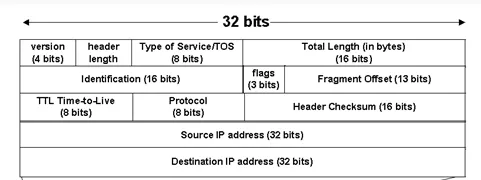
Version: This field tells the IP version – IPv4 or IPv6.
Header Length: This field tells the header length. Most of the time, you will see the header length is 5. Here, 5 represents the total number of rows in the header. If this value is 6, the options field is also present in the header, but this will be very rare.
Type of Service (TOS): This is an 8-bit field. This TOS field is used to prioritize the traffic. For example, in a company, there is an important meeting going on, so we don’t want any interruption in the meeting; in this case, we set a higher priority by using TOS.
Total Length: Total length represents the length of the header and data.
Total length = header + data |
Identification Field: When a packet is large, normally packet is normally divided into parts before sending, these parts are known as fragments. To collect these fragments at the receiver side, an identification field is added. Fragments that belong to the same packet have the same identification value.
Flags: This field has 3 bits; a combination of these 3 bits represents 3 different actions. Mainl,y different combinations of flags tell packet is fragmented or not.
0 | 000 | Resend |
1 | 001 | No fragmentation |
2 | 010 | Fragmentation |
Mainly, packets are fragmented when the size is greater than 1500bytes (header+data).
Because the Maximum Transmission Unit (MTU) = 1500 bytes.
Fragment Offset: This field is used to indicate the position of the fragments in the packet. It tells the sequence number in which fragments are arranged to reassemble the original packet.
Fragment offset value is very useful in recollecting the fragments at the receiver side, because many times fragments appear randomly.
Time to Live: By default, the TTL value is 64. A user can set it manually up to 255.
TTL value is used to avoid layer 3 infinite loops. When TTL = 0 (zero), the packet is dropped.
TTL value is decremented as it traverses the router in the path. For example, let's suppose the initial TTL value is 64. To reach a destination, there are 4 routers in the path, so the TTL value is decremented by 1 every time it passes a router, and in last TTL value will be 60. You can also calculate Hop counts by using the TTL value.
Hop counts = Initial TTL- final TTL
Protocol Number: This field represents the protocol number.
Protocol | Protocol Number |
TCP | 6 |
UDP | 17 |
ICMP | 1 |
OSPF | 89 |
Header Checksum: This is responsible for checking errors. It only checks the header error; if any error is present in the header, it drops the packet.
Source IP address: This field represents the IP address of the sender. This is 32 32-bit fields.
Destination IP address: This field represents the IP address of the destination. This is also a 32-bit field.
Note: Source IP and destination IP address fields never change; they remain the same, doesn’t matter where you check.
What is the size of the IP header?
It is very simple to calculate. Just look at the IP header once, now notice each row is 32 bits in length and there are a total of 5 rows. So, 5×32 = 160 bits.
As we know, 1 byte = 8 bits, so 160 ÷ 8 = 20 bytes.
So, The IP header size is 20 bytes (160 bits).

The founder of Network Kings, is a renowned Network Engineer with over 12 years of experience at top IT companies like TCS, Aricent, Apple, and Juniper Networks. Starting his journey through a YouTube channel in 2013, he has inspired thousands of students worldwide to build successful careers in networking and IT. His passion for teaching and simplifying complex technologies makes him one of the most admired mentors in the industry.