
Color coding of straight and crossover cable
Wednesday, July 13, 2016
Ethernet cables form the backbone of modern networking infrastructure, but many IT professionals and enthusiasts don't fully understand the critical differences between straight and crossover cables. Getting the color-coding wrong can lead to network failures, connectivity issues, and wasted troubleshooting time. This comprehensive guide demystifies cable color coding standards so you can crimp, install, and troubleshoot Ethernet cables with confidence.
Understanding Ethernet Cable Basics
Ethernet cables contain eight colored wires arranged in specific sequences to transmit data across networks. The color coding isn't arbitrary—it follows international standards (TIA/EIA-568A and TIA/EIA-568B) that ensure proper signal transmission and network compatibility. Knowing these standards is essential for network technicians, IT professionals, and anyone responsible for network infrastructure maintenance.
The Standard Color Sequence
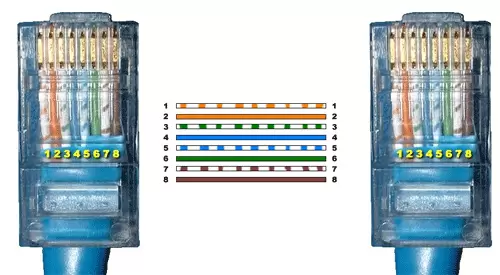
Both straight and crossover cables use the same eight wire colors, but arrange them differently. The standard colors follow this order:
White/Orange
Orange
White/Green
Blue
White/Blue
Green
White/Brown
Brown
Understanding this sequence is your foundation for creating either cable type correctly.
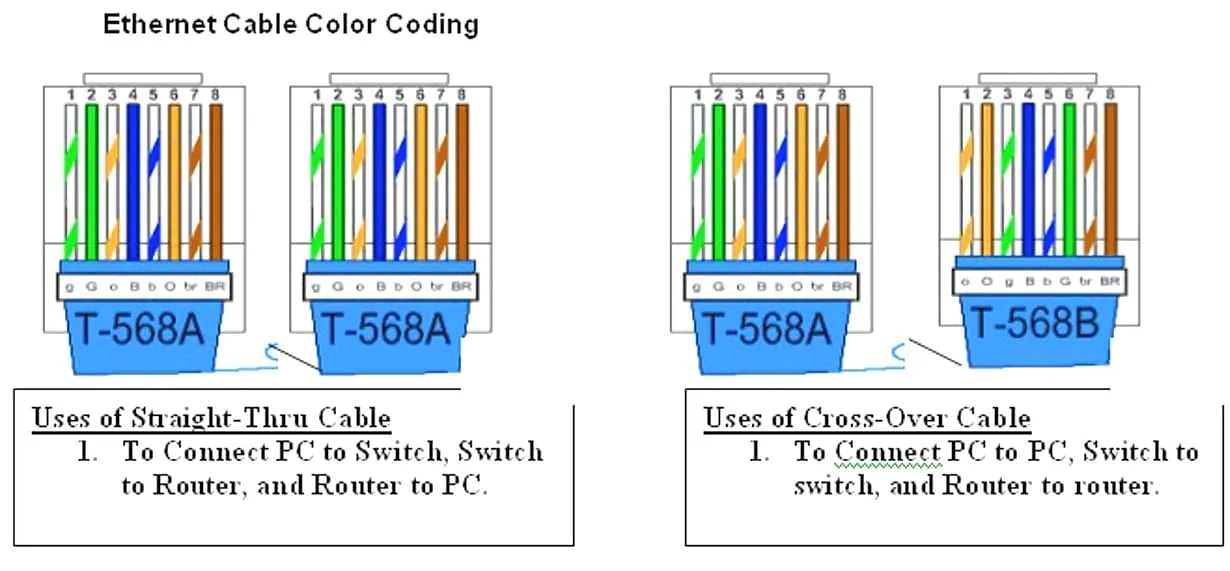
Straight and crossover cable color code
Straight-Through Cable: Color Coding Explained
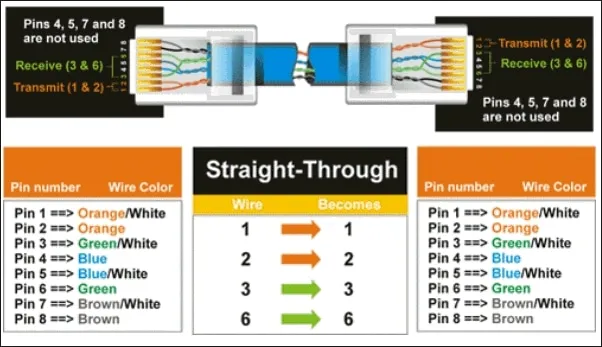
Straight-through cables (also called patch cables) maintain the same wire sequence on both ends. This is the most common Ethernet cable type used in modern networks.
Color Order for Straight Cables:
Both ends follow this identical sequence:
White/Orange → Orange → White/Green → Blue → White/Blue → Green → White/Brown → Brown
When to Use Straight Cables:
Connecting computers to network switches
Linking switches to routers
Connecting devices to wall outlets (patch panels)
Connecting printers, servers, and other network devices to the network infrastructure
Modern device-to-device connections (most common scenario)
Crossover Cable: Color Coding Demystified
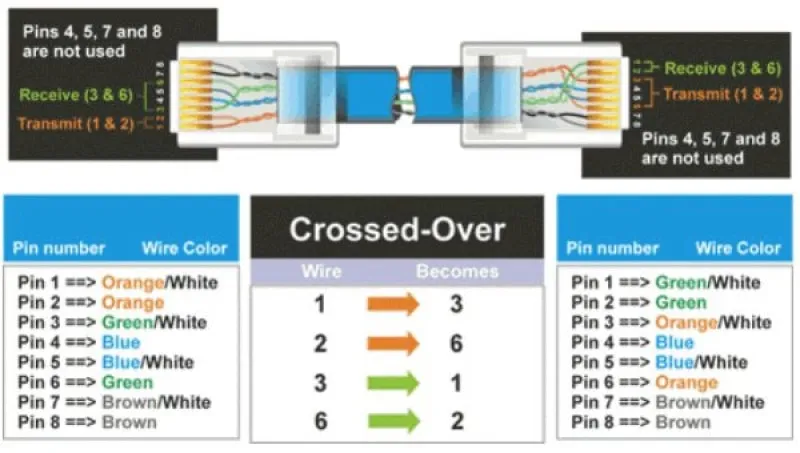
Crossover cables reverse the wire sequence on one end, effectively "crossing over" the transmit and receive pairs. This specialized cable type serves specific networking purposes.
Color Order for Crossover Cables:
End 1: White/Orange → Orange → White/Green → Blue → White/Blue → Green → White/Brown → Brown (568B standard)
End 2: White/Green → Green → White/Orange → Blue → White/Blue → Orange → White/Brown → Brown (568A standard)
The key difference: the orange and green wire pairs swap positions between the two ends.
When to Use Crossover Cables:
Connecting two computers directly without a switch or hub
Linking two switches together without uplink ports
Connecting two routers directly
Linking hubs or repeaters together
Legacy network configurations
Key Differences: Straight vs. Crossover at a Glance
Straight-Through Cables:
Same color sequence on both ends
Used for most modern connections
Compatible with auto-sensing ports
Easier to remember and implement
Crossover Cables:
Different color sequence on each end
Used for specific device-to-device connections
Required for older equipment without auto-sensing capabilities
Rarely needed in modern networks due to auto-MDI/MDIX technology
Modern Networking and Auto-Sensing Technology
Contemporary network devices feature auto-sensing (MDI/MDIX) technology that automatically detects cable type and adjusts accordingly. This means straight-through cables now work in virtually all situations, making crossover cables increasingly obsolete. However, understanding their function remains important for network professionals maintaining legacy systems or troubleshooting connectivity issues.
Practical Tips for Cable Implementation
Follow these professional best practices when working with Ethernet cables:
Always use straight-through cables unless connecting legacy devices
Keep a color-coded reference chart at your workstation
Test all cables before installation using a cable tester
Label both ends of every cable for future reference
Ensure proper cable management to avoid damage
Use quality cables rated for your network speed (Cat5e for gigabit, Cat6 for faster speeds)
Pin Number Designations for T568B-T568B
T568B-T568B (also written as 568B-568B) is the standard pin configuration for straight-through Ethernet cables where both ends use the identical T568B color sequence. This configuration is used in approximately 99% of modern network installations and is the industry standard for patch cables and permanent installations.
T568B Color Sequence and Pin Assignments
The T568B standard defines the following pin order from Pin 1 to Pin 8
Pin Number | Wire Color | Function |
|---|---|---|
1 | White/Orange | Transmit+ (TX+) |
2 | Orange | Transmit- (TX-) |
3 | White/Green | Receive+ (RX+) |
4 | Blue | Unused (in standard Ethernet) |
5 | White/Blue | Unused (in standard Ethernet) |
6 | Green | Receive- (RX-) |
7 | White/Brown | Unused (in standard Ethernet) |
8 | Brown | Unused (in standard Ethernet) |
Visual Pin Layout
When looking at the RJ45 connector head-on with the clip facing away from you, the pins are numbered left to right:
T568B Sequence (Left to Right): White/Orange → Orange → White/Green → Blue → White/Blue → Green → White/Brown → Brown
Pin Number Designations for T568A
The T568A specification reverses the orange and green connections so that pairs 1 and 2 are on the centre 4 pins, which makes it more compatible with the telecom voice connections. (Note that in the RJ-11 plug at the top, pairs 1 and 2 are on the centre 4 pins.) T568A goes.
Mastering Ethernet cable color coding distinguishes competent network professionals from amateurs. While modern networks increasingly rely on auto-sensing technology, understanding both straight and crossover cable standards remains essential for network deployment, troubleshooting, and maintaining infrastructure integrity. Whether you're a networking student, IT technician, or system administrator, this knowledge ensures reliable network connectivity and professional credibility in your field.

The founder of Network Kings, is a renowned Network Engineer with over 12 years of experience at top IT companies like TCS, Aricent, Apple, and Juniper Networks. Starting his journey through a YouTube channel in 2013, he has inspired thousands of students worldwide to build successful careers in networking and IT. His passion for teaching and simplifying complex technologies makes him one of the most admired mentors in the industry.